Android & Windows PC Setup
Sheru Bhai Game Download: Official Android & PC Install Guide
Verify exact Google Play publisher names and package IDs before starting any Sheru Bhai Game download, check realistic RAM and storage budgets, and set up Windows PC play cleanly.
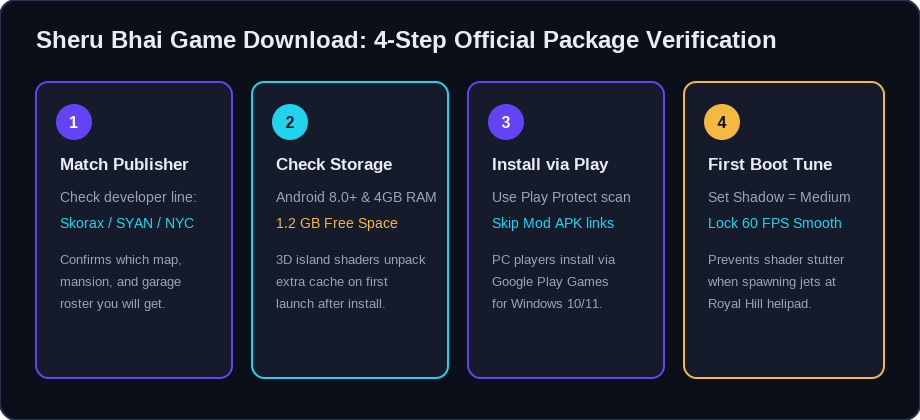
How to Verify Your Sheru Bhai Game Download Before Installing
Completing a safe Sheru Bhai Game download starts with checking the publisher line and package string inside Google Play rather than tapping the first green button on an external mirror site. Because six separate Android titles launched during November 2026 with similar white-lion icons, checking two lines of store metadata guarantees you install the exact 3D sandbox or street driving edition you want. If you prefer skipping installation altogether, you can always launch our browser arcade directly on the Sheru Bhai Game homepage.
Open the Google Play Store app on your phone, search the title, and tap into the app details screen before pressing Install. Scroll to the "About this game" panel and confirm the developer name matches one of the active studio listings:
- Skorax (
com.Skorax.SheruBhaiGame): Choose this Sheru Bhai Game download if you want the island open world, Royal Hill mansion interior, walk-in suit wardrobe, smartphone vehicle delivery, helicopters, jets, and official Windows PC compatibility. - SYAN (
com.syan.sherubahi.game.life.sim): Pick this build if you want Indian urban street missions, local market traffic, and lighter memory usage on midrange phones. - NYC Studio (
com.nyc.sherubhai.simulator.game): Focused on supercar cruising, wide-boulevard drifts, and stunt ramps. - ONLYTECH (
com.ot.sheru.bhai.aura.game): Built around Aura reputation points, custom blazers, and Royal City district unlocks.
If you want a side-by-side gameplay comparison before choosing a package, check our Sheru Bhai Ka Game edition matrix.
Android System Requirements and Storage Checklist
Three-dimensional open-world simulators push mobile GPUs harder than 2D casual games, especially when rendering reflections on supercars or flying a helicopter above an island shoreline. Before starting your Sheru Bhai Game download, match your phone against the hardware table below so the app does not close on the loading bar.
| Specification | Minimum Android Target | Recommended Smooth 60 FPS Target |
|---|---|---|
| Operating System | Android 8.0 (Oreo) or newer | Android 11, 12, 13, or 14 |
| System Memory (RAM) | 3 GB RAM (low shadow preset) | 6 GB+ RAM (high draw distance) |
| Free Internal Storage | 1.2 GB available before install | 2.5 GB free for shader & update cache |
| Processor Class | Octa-core Snapdragon 662 / Helio G80 | Snapdragon 778G / Dimensity 8000 or higher |
| Network Connection | Required for store install only | Offline single-player supported after boot |
When free internal storage drops below 1 GB, Android often pauses asset extraction right after the store progress bar reaches 99 percent. Clearing cached video clips and restarting your handset before initiating a Sheru Bhai Game download resolves almost every stuck-installation complaint.
Step-by-Step PC Setup via Google Play Games
Many players prefer driving supercars and piloting jets on a desktop monitor instead of a small touchscreen. Skorax enabled official PC distribution for its build, meaning your Sheru Bhai Game download on Windows 10 or Windows 11 does not require shady third-party emulators bundled with unwanted toolbars.
- Check Windows Hardware Virtualization: Open Windows Task Manager, switch to the Performance tab, click CPU, and verify "Virtualization: Enabled" appears in the bottom-right corner.
- Install Official Google Play Games for PC: Download the desktop client from Google's official Play Games portal on a machine with at least 8 GB RAM, an SSD with 10 GB free space, and a quad-core CPU.
- Sign In With Your Google Account: Use the same account you use on your Android phone if you want your library synced.
- Search Skorax's Listing: Look up
Sheru Bhai Life Simulator Gameinside the PC client and start the Sheru Bhai Game download. Once installed, keyboard WASD steering and mouse camera look map automatically.
For players on school Chromebooks, office laptops, or macOS machines where Windows virtualization is unavailable, open our Sheru Bhai Game Online guide to play Royal Lion City Drive straight in your browser tab.
Why You Should Skip Unofficial Mod APK Sites
Search results for Sheru Bhai Game download often include third-party APK aggregator pages promising "unlimited coins," "all cars unlocked v99," or compressed 40 MB installers. Every core vehicle and mansion room in Skorax's and SYAN's official builds is already accessible through normal free-roam play or built-in phone menus—detailed in our Sheru Bhai Life Simulator and Sheru Bhai Wala Game guides—so modified packages offer zero real gameplay advantage.
Worse, altered APK files break the original cryptographic signature. That means Google Play Protect blocks them, official bug-fix patches cannot install on top of them, and repackaged archives frequently inject full-screen pop-up scripts outside the game itself. Keeping every Sheru Bhai Game download strictly inside verified store channels protects both your handset battery and personal data.
Fixing Black Screen or Stuck Loading After Installation
If your Sheru Bhai Game download finishes cleanly on Google Play but hangs on the studio splash screen during first launch, work through these four quick fixes:
- Wait 30 Seconds on First Shader Compile: Unity and Unreal mobile open-world builds compile graphics shaders on the very first run. Avoid tapping the screen repeatedly during that initial bar, or Android will trigger an "App isn't responding" prompt prematurely.
- Close Background Camera and Reel Apps: Short-video apps hold hundreds of megabytes of VRAM. Swiping them away frees memory for island terrain streaming.
- Toggle Airplane Mode for Offline Testing: If a slow mobile signal stalls an ad-SDK handshake at startup, launching once in Airplane Mode confirms whether network timeout is the culprit.
- Lower Graphics Preset Immediately in Settings: On 3 GB and 4 GB RAM phones, drop shadow quality and traffic density to Medium before summoning helicopters at Royal Hill.
Frequently Asked Questions
- Where is the safest place to get a Sheru Bhai Game download?
- Use the official Google Play Store app on Android or Google Play Games on Windows 10 and Windows 11. Both channels verify developer signatures automatically through Play Protect.
- How much storage space does Sheru Bhai Game download require?
- Set aside at least 1.2 GB of free internal storage on Android. Even when the initial store package looks smaller, 3D city textures and vehicle meshes expand during first boot.
- Is there an official iOS App Store version yet?
- As of late November 2026, the main 3D open-world releases are listed on Google Play for Android and PC. iPhone and iPad users can play our HTML5 highway edition directly in Safari with zero install.
- Are unlimited money Mod APK files safe to install?
- No. Third-party Mod APK files strip developer signatures, break future updates, and frequently bundle intrusive background adware. Stick to verified store listings or browser play.