Royal Phone & Performance Guide
Sheru Bhai Wala Game: Royal Phone Menu & Smooth 60 FPS Tips
Use the in-game Royal Phone menu to summon supercars and helicopters cleanly, eliminate frame drops on budget phones, and play offline without mobile data stalls.
Mastering the In-Game Royal Phone in Sheru Bhai Wala Game
Players searching Sheru Bhai Wala Game ("the game featuring the lion boss") almost always want two practical things once they load into the city: instant access to exotic vehicles without walking across the map, and smooth frame rates that do not stutter during high-speed turns. While you can jump straight into three-lane supercar action anytime on our Sheru Bhai Game homepage, mastering the in-game smartphone inside the 3D mobile editions unlocks the entire vehicle sandbox in seconds.
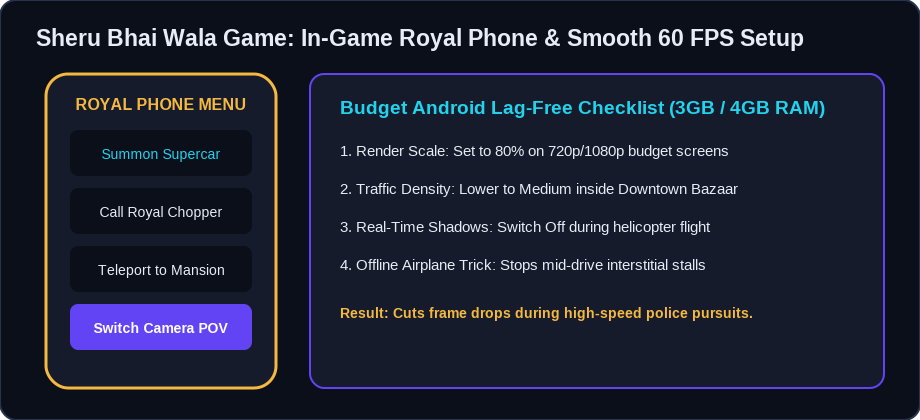
In Indian open-world driving games, older titles trained players to hunt for secret four-digit dial-pad cheat strings. In the November 2026 Sheru Bhai Wala Game releases, particularly Skorax's island simulator and its sister builds, developers replaced cryptic number memorization with a visual Royal Phone interface anchored on the HUD:
- Sports & Hypercars Tab: Drops a low-slung coupe right in front of your character's facing direction for immediate highway runs.
- Superbikes Tab: Summons agile two-wheelers ideal for weaving between buses and market stalls in tight alleys.
- Heavy & 6x6 SUVs Tab: Delivers high-clearance armored trucks built for steep hillside climbs up to Royal Hill.
- Aircraft / Chopper Tab: Spawns a personal helicopter. Always face an open road or courtyard with at least five meters of overhead clearance before tapping this option.
- Camera & Home Reset: Lets you toggle between third-person chase view, hood view, and quick return to the mansion gate.
To see where each summoned vehicle performs best across the four island zones, check our Sheru Bhai Life Simulator district map.
Smooth 60 FPS Settings for 3 GB & 4 GB RAM Android Phones
Because Sheru Bhai Wala Game renders glossy car paint, wide city draw distances, and character fur shading simultaneously, midrange handsets can experience noticeable frame dips around busy intersections. Applying these four adjustments inside the pause/gear menu stabilizes frame pacing right away:
| Graphics Setting | Heavy Default Value | Recommended Smooth Setting | Performance Impact |
|---|---|---|---|
| Resolution / Render Scale | 100% Native | 80% Scale | Cuts GPU pixel fill load by ~35% with minimal blur |
| Real-Time Shadows | High / Dynamic | Off or Blob Only | Eliminates stutter when flying above Royal Hill trees |
| AI Traffic Density | High | Low or Medium | Frees CPU cycles and clears highway lanes for top speed |
| Post-Processing / Bloom | Enabled | Disabled | Keeps phone surface temperature cooler on 20-minute sessions |
If you have not installed an app yet and want to pick the lightest edition for your specific handset, compare all six packages in Sheru Bhai Ka Game or follow the storage checklist in Sheru Bhai Game Download.
Offline Play Test: Running Without Mobile Data
A major perk of Sheru Bhai Wala Game for commuters and students on capped daily data plans is offline free-roam compatibility. During our verification checks on the Play Store releases, initial installation and first-time shader unpacking require a stable connection, but subsequent free-roam sessions launch cleanly offline.
Running an offline session also solves another common annoyance: third-party ad networks inside free Android simulators occasionally freeze the frame for two seconds while fetching video banners mid-drive. Pausing mobile data keeps frame delivery steady while you practice coastal drifts or rooftop helicopter landings.
Camera Angles, Drift Timing & Roar Shield Equivalents
Whether you are playing a 3D mobile app or chasing leaderboard milestones in our browser highway game, clean cornering and hazard timing separate casual runs from top scores in Sheru Bhai Wala Game:
- Tap Brake Before Turning, Not Mid-Spin: In 3D street builds, tapping the handbrake for half a second right before entering a 90-degree bazaar corner pivots the rear axle cleanly without spinning into a storefront.
- Use Chase-Far Camera in Dense Traffic: Widening the camera pull-back lets you spot oncoming patrol cars two intersections early.
- Time Your Roar Shield in Browser Mode: When playing Royal Lion City Drive online—detailed in our Sheru Bhai Game Online guide—treat Roar Shield just like an emergency clear button. Hold your charges through early Marine Coastal Sprint traffic, then fire when Downtown Bazaar Rush throws twin barriers across your lane.
No matter which edition you prefer, combining smart graphics settings with clean vehicle spawns turns choppy test drives into effortless royal cruising.
Frequently Asked Questions
- Does Sheru Bhai Wala Game use dial-pad number cheat codes or a button menu?
- Unlike older gang-sandbox games that require typing four-digit dial codes, most November 2026 white-lion builds use a visual Royal Phone button menu where you tap vehicle categories directly.
- Can you play offline without mobile data?
- Yes. Once an official Android release finishes unpacking its first-boot assets, free-roam driving and vehicle spawning work offline with Wi-Fi and mobile data switched off.
- Why does my helicopter flip over right after spawning?
- Spawning a wide-rotor helicopter next to a lamppost, wall, or palm tree clips the blades immediately. Walk into the center of an intersection or courtyard before tapping Summon Chopper.
- How do I play instantly without installing an Android app?
- Head to our homepage and click Play to run Royal Lion City Drive right inside your mobile or desktop web browser.