Zero-Install HTML5 Manual
Sheru Bhai Game Online: Browser Controls & High-Score Guide
Everything you need to play Sheru Bhai Game Online in any modern desktop or mobile browser—full keybindings, garage unlock thresholds, scoring math, and troubleshooting.
How Sheru Bhai Game Online Works With Zero Download
Playing Sheru Bhai Game Online solves the biggest hurdle facing PC, Mac, iPhone, and low-storage Android users: you do not have to clear 1.2 GB of phone space or configure a desktop Android emulator just to take the white lion's supercar for a spin. On our Sheru Bhai Game homepage, clicking the Play button boots Royal Lion City Drive directly inside an HTML5 Canvas stage in under two seconds.
Let's be completely transparent about how browser play compares to native mobile apps. The heavy 3D free-roam releases on Google Play—such as Skorax's island sandbox covered in our Sheru Bhai Life Simulator guide—are standalone native packages that you install via Sheru Bhai Game Download. By contrast, Sheru Bhai Game Online is a purpose-built browser highway arcade crafted specifically for instant web sessions: crisp 60 FPS lane-switching, three unlockable Royal Hill vehicles, shockwave power-ups, synthesized arcade sound effects, and a live cloud leaderboard.
Desktop Keyboard & Mobile Touch Control Reference
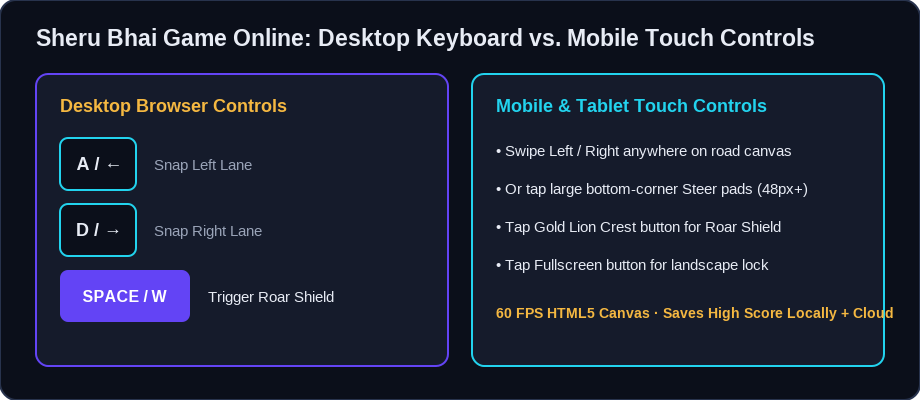
Responsive input is everything once highway speed ramps up past 800 points. Sheru Bhai Game Online supports both keyboard shortcuts and one-handed or two-handed mobile touch gestures simultaneously:
| Action | PC / Laptop / Chromebook Keys | Android & iOS Mobile Browser Touch |
|---|---|---|
| Snap One Lane Left | A key or Left Arrow (←) |
Swipe left on road or tap ◀ bottom-left pad |
| Snap One Lane Right | D key or Right Arrow (→) |
Swipe right on road or tap ▶ bottom-left pad |
| Fire Roar Shield Wave | Spacebar, W, or Up Arrow (↑) |
Tap purple 🦁 ROAR SHIELD button on bottom-right |
| Quick Restart After Run | Enter key or click Drive Again |
Tap Drive Again on summary card |
| Toggle Arcade Audio | Click Sound: ON/OFF in top HUD |
Tap Sound: ON/OFF in top HUD |
Because lane changes use high-response interpolation rather than sluggish analog drift, tapping A twice snaps you cleanly from the right shoulder all the way to the left lane in a fraction of a second.
Scoring Breakdown, Garage Unlocks & District Speeds
Climbing into the top five on the Sheru Bhai Game Online global leaderboard requires understanding where points come from and which garage vehicle matches your playstyle:
- Royal Gold V12 Coupe (Unlocked at 0 pts): Speed rating 9.2, starts every run with 2 Roar Shield charges. Ideal all-rounder for learning lane rhythm.
- Desi Superbike (Unlocked at 600 pts): Speed rating 10.6, starts with 1 Roar Shield charge. Faster base pace earns passive distance points quicker for aggressive players.
- Royal 6x6 Armored SUV (Unlocked at 1,400 pts): Speed rating 8.5, starts with 3 Roar Shield charges. Slightly steadier cruising speed plus an extra shockwave makes it the king of 2,500+ point marathon runs.
During a run in Sheru Bhai Game Online, passive distance points tick upward continuously based on road speed, while active pickups multiply your total rapidly:
- Royal Crowns (+25 to +125 pts): Your first crown awards +25 points and increments your combo counter by +1 up to a 5x cap. At 5x combo, every single crown adds +125 points.
- Blue Energy Gems (+50 pts + 1 Roar): Refills one Roar Shield slot (up to 5 held at once) and adds 50 flat points. Always prioritize gems over single crowns past 1,000 points.
- Near Miss Skims (+15 pts): Passing adjacent to a patrol cruiser or stop barrier as it clears your bumper triggers a +15 Near Miss popup.
- Roar Shield Smashes (+40 pts per hazard): Activating Roar Shield sends a golden ring outward, destroying every obstacle currently on the asphalt and awarding +40 points for each cleared hazard.
Browser Performance & Troubleshooting Tips
If Sheru Bhai Game Online feels choppy on an older laptop or budget phone browser, check these three quick settings:
- Enable Hardware Acceleration in Chrome/Edge: Under Browser Settings -> System, ensure "Use graphics acceleration when available" is toggled on so HTML5 Canvas renders on your GPU instead of software CPU threads.
- Switch Off Battery Saver Mode: Both iOS Low Power Mode and Android Battery Saver cap web
requestAnimationFrameloops at 30 Hz instead of 60 Hz. Disabling power saver restores silky 60 FPS lane movement. - Add to Home Screen for Full-Height View: Tap
+ Add to Home Screenbelow the player on the homepage to launch Sheru Bhai Game Online in standalone app-window mode without address-bar clutter. Players curious about mobile app editions can also browse Sheru Bhai Ka Game and Sheru Bhai Wala Game.
Frequently Asked Questions
- Can I play Sheru Bhai Game Online on iPhone, iPad, or Chromebook?
- Yes. Because Royal Lion City Drive uses standard HTML5 Canvas and Web Audio, it runs natively inside Safari on iOS/iPadOS, Chrome on Chromebooks, and Edge or Firefox on Windows and Mac.
- Does Sheru Bhai Game Online require an account or sign-up?
- No account or email sign-up is needed. Click Play on the homepage to drive immediately, and optionally type a nickname at the end of a run to appear on the global leaderboard.
- Is the full 1.2 GB Android island app streamed in the browser?
- No. Full 3D Android packages like Skorax's island simulator require native installation via Google Play. Our browser game is a custom-built, fast-loading 3-lane highway arcade inspired by the same Royal Hill cars and coastal theme.
- How do I enable landscape fullscreen on my phone?
- Tap the Fullscreen button right below the game player on the homepage. On supported mobile browsers, the stage expands edge to edge for wider thumb control.