Browser & Android Repair Checklist
Sheru Bhai Game Not Working: Black Screen, Crash & Lag Fixes
Step-by-step fixes when Sheru Bhai Game fails to open, stalls on a black screen, pauses at 99% on Google Play, or stutters on 3GB RAM phones and mobile browsers.
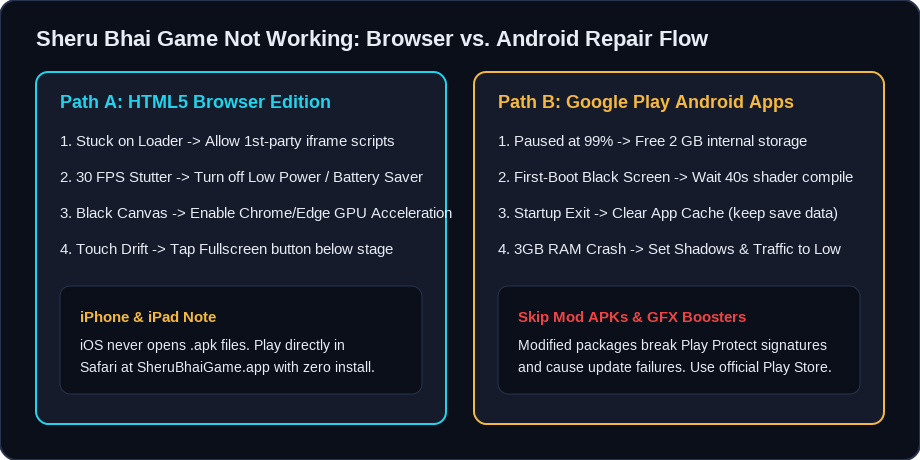
Identify Which Edition Has the Sheru Bhai Game Not Working Issue
Fixing a Sheru Bhai Game not working error takes less than two minutes once you separate browser HTML5 issues from native Google Play Android app crashes. Because players use the same search name for both our instant web highway game (Royal Lion City Drive on the Sheru Bhai Game homepage) and six third-party Android 3D simulators by studios like Skorax and SYAN, applying an Android cache fix to a browser tab wastes time.
Start by matching your exact symptom to the two platforms below before changing phone settings:
- Web Browser Edition (Chrome, Safari, Edge, Firefox): Runs inside an HTML5 Canvas stage with zero APK install. Startup failures here almost always stem from disabled GPU acceleration, strict script blockers, or battery-saver frame caps.
- Google Play Android Releases (Skorax, SYAN, NYC, ONLYTECH): Standalone 3D mobile apps ranging from 350 MB to over 1.2 GB installed (per Google Play listings and local storage expansion). Crashes here usually involve low free storage, 3 GB RAM memory eviction, or first-boot shader compilation.
If you are unsure which Android studio published the icon on your home screen, check package names first in our Sheru Bhai Ka Game comparison table.
Browser Fixes When Sheru Bhai Game Is Not Working Online
When you see Sheru Bhai Game not working inside a desktop or mobile web browser, the player frame either stays stuck on "Starting Royal Lion Engine" or drops below 30 frames per second during lane changes. Work through these four browser checks in order:
| Browser Symptom | Likely Technical Cause | Verified 30-Second Fix |
|---|---|---|
| Stuck on cover or loader ring | Ad-blocker or script shield blocking /embed/ iframe |
Allow first-party scripts on sherubhaigame.app and reload |
| Choppy 30 FPS lane movement | iOS Low Power Mode or Android Battery Saver active | Disable power-saving mode to restore 60 Hz requestAnimationFrame |
| Blank black canvas on laptop | Browser Hardware Acceleration turned off | Enable "Use graphics acceleration when available" in Chrome/Edge |
| Touch swipes feel delayed | Browser zoom or pull-to-refresh gesture conflict | Tap the Fullscreen button below the player stage (see Sheru Bhai Game Online) |
Testing in Chrome on Android and Safari on iOS shows that switching to Fullscreen mode also hides the floating address bar, preventing accidental back-swipes when weaving past Downtown Bazaar roadblocks.
Android Fixes for Black Screen, Crashing & 99% Install Stalls
On Android phones, most Sheru Bhai Game not working reports cluster around three moments: Google Play stopping at 99 percent during installation, a solid black screen on first launch, or sudden home-screen exits when spawning helicopters near the Royal Hill mansion.
- Clear 2 GB of Free Storage Before Installing: Even when a Google Play listing shows a smaller download size, 3D island textures decompress after download. When free storage dips under 1 GB, Android pauses extraction at 99 percent. Delete old screen recordings, restart your phone, and retry the Sheru Bhai Game Download from the official Play Store.
- Wait Through First-Boot Shader Compilation: Open-world Unity builds compile material shaders the first time they boot on your chipset. Tapping a black screen five times in a row triggers Android's "App isn't responding" dialog even though loading is still progressing. Leave the phone untouched for 40 seconds on Run #1.
- Clear App Cache (Not App Data) After Updates: Long-press the game icon, open App Info -> Storage & cache, and tap Clear cache. That flushes corrupted temporary buffers without wiping local progress.
- Prevent 3 GB RAM Mansion & Helicopter Crashes: In Skorax's Sheru Bhai Life Simulator, summoning multiple supercars and a chopper in the same spot spikes memory usage on 3 GB and 4 GB RAM phones. Swipe away background social apps before playing, and drop shadow distance to Low using the steps in our Sheru Bhai Wala Game performance guide.
Windows PC & iPhone Compatibility Mistakes to Avoid
Two platform mix-ups account for nearly a quarter of Sheru Bhai Game not working questions from overseas players:
- Trying to Open an APK File on iPhone or Mac: Apple devices do not execute Android
.apkpackages, and fake "Sheru Bhai iOS IPA" download sites are unsafe traps. iPhone, iPad, and Mac players should play directly in Safari on our homepage instead. - Windows Play Games Virtualization Disabled: If Skorax's PC build refuses to launch inside Google Play Games on Windows 10 or Windows 11, open Windows Features, enable Windows Hypervisor Platform, reboot once, and relaunch.
Safe Troubleshooting vs. Risky Repair Tools
Never install third-party "GFX booster APKs" or modified "crash-fix patched APKs" claiming to resolve a Sheru Bhai Game not working problem on budget phones. Unofficial booster tools cannot add physical RAM to your handset, and repackaged APKs strip Google Play Protect signatures while injecting background pop-up ads. If a heavy 3D island build still closes on an older 2 GB or 3 GB RAM device after clearing cache and lowering shadows, switching to a lighter street edition like SYAN's listing or playing our zero-install HTML5 highway edition gives you smooth driving without risking device security. Still running into a Sheru Bhai Game not working bug on a specific browser? Send your device model and browser version to our team on the Contact page so we can reproduce it.
Frequently Asked Questions
- Why does Sheru Bhai Game show a black screen right after opening on Android?
- Three-dimensional mobile builds like Skorax's island simulator compile graphics shaders during their very first boot. Give the splash screen 30 to 45 seconds without tapping repeatedly, and keep at least 1.5 GB of free internal storage.
- Why is Sheru Bhai Game not working on my iPhone or iPad?
- Standalone APK files only run on Android, so downloaded Android packages will never open on iOS. To play on iPhone or iPad, open SheruBhaiGame.app in Safari and run our built-in HTML5 edition, Royal Lion City Drive, directly in the browser.
- How do I fix lag or 30 FPS stutter in the browser version?
- Turn off iOS Low Power Mode or Android Battery Saver, close heavy background video tabs, and verify Hardware Acceleration is enabled in Chrome or Edge settings so HTML5 Canvas renders on your GPU.
- Will clearing Android app cache erase my saved cars or progress?
- Tapping Clear Cache inside Android App Info only removes temporary shader and ad buffers while keeping your local save data intact. Avoid tapping Clear Storage unless you intend to reset your profile completely.